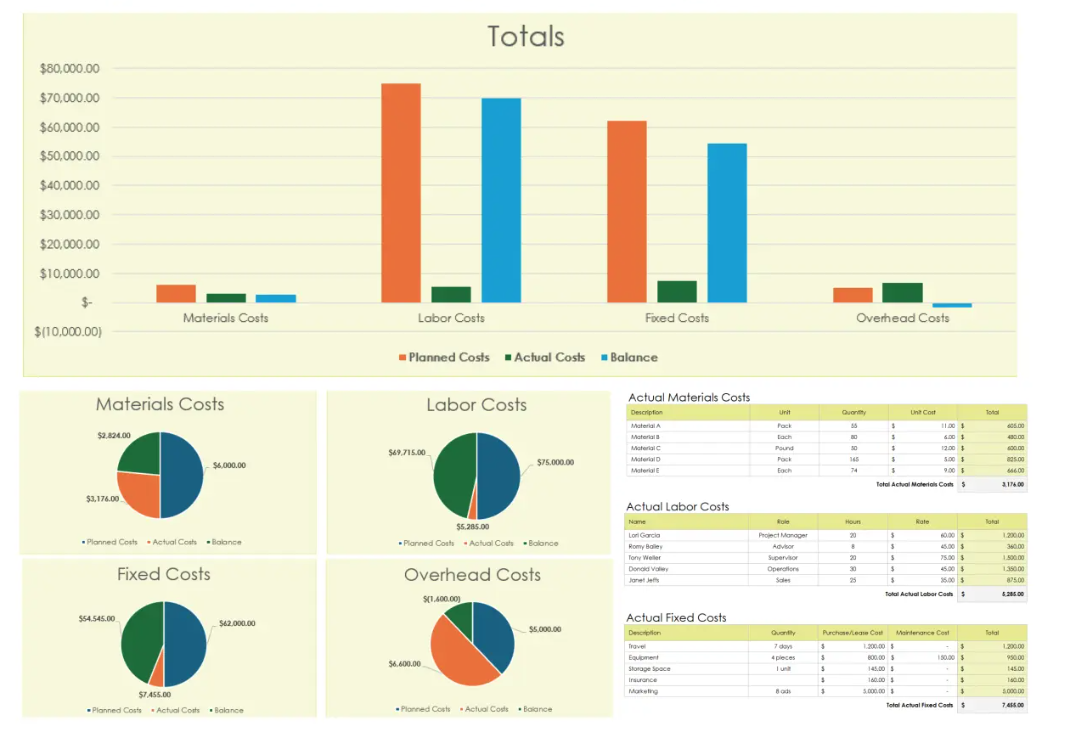
Automated Excel Dashboard Templates – Boost Productivity with Smart Reporting
Original price was: $7.00.$5.00Current price is: $5.00.
Description
Introduction
In today’s data-driven business environment, efficient reporting and analysis are essential for growth. Automated Excel Dashboard Templates provide a powerful solution to track performance, visualize data, and make informed decisions without manual effort. Whether you are managing finances, sales, marketing campaigns, or operations, these templates streamline workflows and improve accuracy.
What Are Automated Excel Dashboard Templates?
Automated Excel dashboards are pre-designed spreadsheets built in Microsoft Excel that use formulas, charts, pivot tables, and sometimes macros to automatically update data and generate real-time insights.
They eliminate repetitive manual tasks and allow users to focus on analysis rather than data entry.
Key Features of Automated Excel Dashboards
-
Real-Time Data Updates
Automatically refresh data with built-in formulas and connections. -
Interactive Visualizations
Dynamic charts, graphs, and slicers for better data understanding. -
User-Friendly Interface
Easy navigation with clean layouts and structured data sections. -
Customizable Design
Modify templates according to your business needs. -
Error Reduction
Minimize human errors with automated calculations.
Types of Excel Dashboard Templates
1. Sales Dashboard
Track revenue, conversions, and sales performance with visual insights.
2. Financial Dashboard
Monitor expenses, profit margins, cash flow, and budgeting.
3. Marketing Dashboard
Analyze campaign performance, ROI, and lead generation metrics.
4. Project Management Dashboard
Track project progress, deadlines, and team performance.
5. HR Dashboard
Manage employee data, attendance, and performance tracking.
Benefits of Using Automated Excel Dashboards
-
Saves Time
Reduces hours spent on manual reporting tasks. -
Improves Decision-Making
Provides accurate and real-time data insights. -
Enhances Productivity
Teams can focus on strategic work instead of repetitive tasks. -
Cost-Effective Solution
No need for expensive analytics tools.
Who Should Use These Templates?
-
Small business owners
-
Digital marketers
-
Financial analysts
-
Project managers
-
Freelancers and agencies
How to Use Automated Excel Dashboard Templates
-
Download the template
-
Input your data or connect your data source
-
Customize fields based on your requirements
-
Refresh data to view updated insights
-
Use filters and slicers for detailed analysis
SEO Benefits for Businesses
Using automated dashboards helps businesses optimize their strategies based on real data. This leads to:
-
Better keyword performance tracking
-
Improved campaign ROI analysis
-
Data-driven content planning
Why Choose Our Excel Dashboard Templates?
-
Professionally designed layouts
-
Fully automated and easy to use
-
Compatible with all Excel versions
-
Ready-to-use with minimal setup
-
Ideal for freelancers, agencies, and businesses
Related products
-
Sale!

Business KPI Tracking Dashboard – Monitor Performance & Drive Growth
Original price was: $7.00.$5.00Current price is: $5.00. -
Sale!

Data Visualization Templates Pack – Transform Data into Actionable Insights
Original price was: $7.00.$5.00Current price is: $5.00. -
Sale!
Sales Report Automation Toolkit – Streamline Reporting & Maximize Sales Performance
Original price was: $7.00.$5.00Current price is: $5.00. -
Sale!

Google Analytics Reporting Template (PDF + Sheet) – Simplify Data Tracking & Client Reporting
Original price was: $7.00.$5.00Current price is: $5.00.
Reviews
There are no reviews yet.